Safety
A measurement of mesoscopic devices moves gates, sources and magnets for hours with nobody looking, and a sample can be lost to one wrong number. mesoscoPy protects the sample and the instruments in several layers. This page lists them in the order they act.
Before you start
- Safe limits and maximum ramp rates
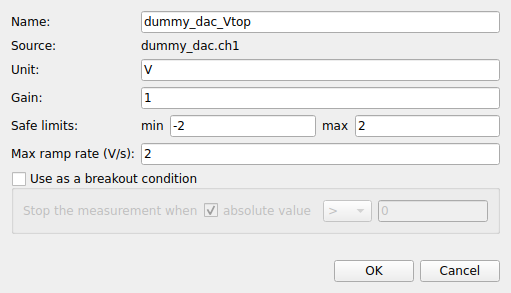
Every experiment parameter that can be set has safe limits and a maximum ramp rate, in the station file (limits, step and inter_delay) or in the Parameter explorer. A value outside the limits is refused whatever asks for it: a sweep, a set typed in the explorer, an action. Every change of the parameter is made in steps that never exceed the ramp rate.
- Presets that switch nothing on
The presets of the station file are applied every time an instrument is loaded. Do not put the switch of an output (a source, a lock-in output) in them unless you are sure of what is connected.
- Check setup
The dry run of the Measurement tab looks at a measurement before it starts: a sweep that leaves the safe limits is refused with the reason, a sweep that reaches the threshold of an alarm and a first move without ramp rate are reported. The same check runs before every manual run and every item of the queue, and a measurement that cannot work is not started.
While it runs
- Alarms
An alarm on a parameter goes off at a percentage of its allowed range (90 % by default) and can show a message, pause the measurement, stop it, or stop it and ramp to 0 (Monitor tab, Settings, Alarms).
- Breakout conditions
A condition on an experiment parameter (for example the absolute value of the leakage current > 1 nA) ends the measurement cleanly when it becomes true.
- Pause, Stop, Stop and ramp to 0
The buttons of the Measurement and Queue tabs. Stop ends after the current point and keeps the data; Stop and ramp to 0 also brings the swept parameters to 0 at their ramp rate. A wait in an action or in a queue step ends at once on Stop.
- One thing at a time
Measurements and your own actions on the instruments (setting a value, a raw command, loading a snapshot) never overlap: an action on an instrument that a measurement uses is refused, and a measurement does not start under a long ramp. Raw commands, which bypass the limits, are refused while a measurement runs.
- Instruments that do not answer
When a read or a set fails during a measurement because the instrument did not answer (a VISA timeout, a lost connection), the measurement does not fail at once: it clears the instrument’s buffer and retries, waiting a little longer each time, a few times (Settings, Measurement: the number of retries and the first wait). The clocks of the run stand still, the status bar says what is happening, and Stop ends the wait. Errors that are not about communication, such as a value refused by a validator, are never retried.
When something goes wrong
- A measurement fails
A driver error ends the measurement. By default mesoscoPy then ramps to 0 the experiment parameters it had changed, each at its ramp rate. An instrument that does not answer is reported and left alone, and the others are ramped. Parameters that were never changed are not touched: there is no reason to ramp what was never moved. (Settings, Measurement switches this off.)
- You close the program
A running measurement is stopped first, then the experiment parameters the program changed (and that are not at 0) are ramped to 0, with a progress window, and only then are the instruments disconnected.
- The program stops unexpectedly
A crash or a power cut cannot ramp anything. The next start offers to restore the interrupted queue (see Queue tab); the data written before the interruption is in the database. Check the state of your instruments before you run again: the gates are where they were left.
What mesoscoPy does not do
mesoscoPy cannot know what is connected to an instrument. It protects the values it sets through experiment parameters; a parameter that you set directly on the front panel of an instrument, or through another program, is outside its control. Check the limits of your sources, and the compliance of the current sources, on the instruments themselves as well.